Chapter 8 – Leo creates his city route
Chapter 8 – Leo creates his city route
Leo arrives at school the next day. His English teacher has a new activity for the class.
— Good morning, class!
— Good morning!
The teacher smiles.
— Today we are going to design a city route.
Leo looks interested.
— A city route?
The teacher explains the project.
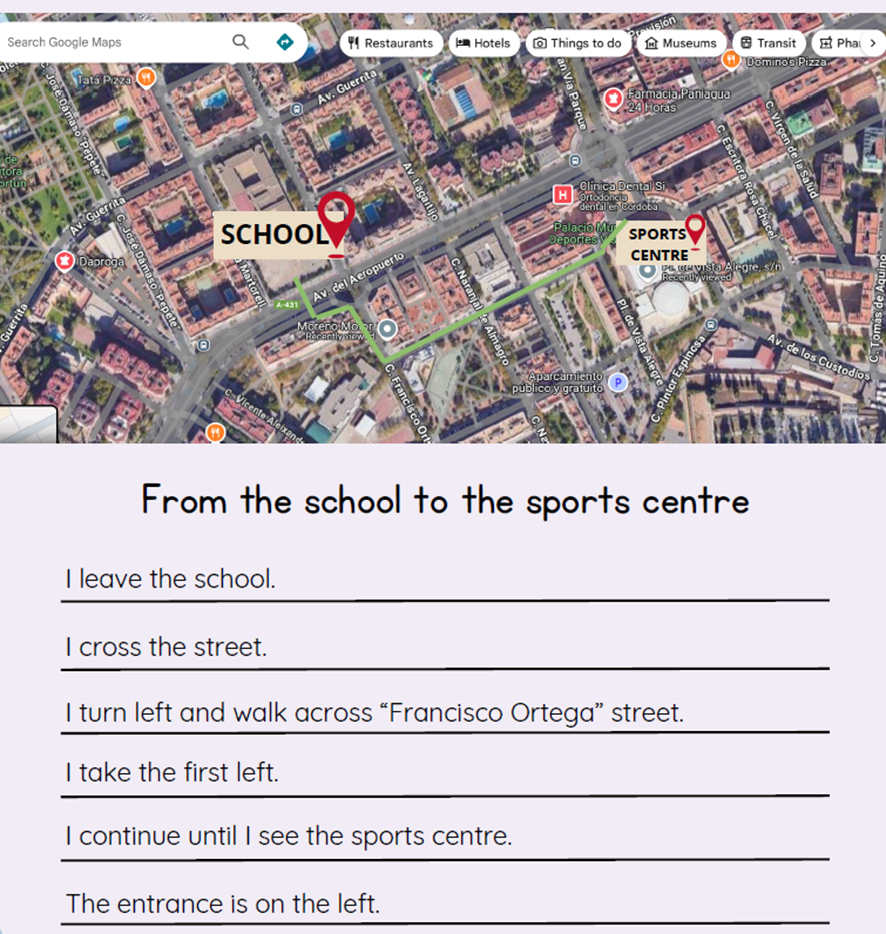
— Yes. You will use Google Maps.
— First, choose a place near your school.
Leo raises his hand.
— Can we choose any place?
— Yes! You can choose a park, a library, a restaurant, or any place in the city.
The teacher continues.
— Next, take a screenshot of the map.
Leo opens his tablet.
— Like this?
— Exactly!
Leo looks at the map of Sunny Town.
— I want to go to the sports centre.
His friend asks:
— Why the sports centre?
Leo smiles.
— Because I like playing football.
The teacher continues explaining.
— After the screenshot, put the picture in a Canva slide.
Leo nods.
— Okay!
The teacher writes on the board.
— Finally, write the directions to go to that place.
Leo looks at the map again.
— I know how to do that!
His friend looks curious.
— Really?
Leo points at the route on the map.
— First, go straight from the school.
— Then turn right at the park.
— Finally, the sports centre is on the left.
His friend smiles.
— That’s easy!
Leo closes his tablet.
— Sunny Town is easy when you know the map.
The teacher looks at the class.
— Now it’s your turn.
Leo looks excited.
— Let’s create our city tour!